Table of Contents: Business Hub is not ChatGPT Business or an ads account
How to Manage Your Business on ChatGPT with Business Hub
 Giorgio Sanna•Published on
Webita GEO
Track brand, keywords and visibility across Google and AI models
A dedicated dashboard to monitor strategic queries, brand mentions and GEO signals.

Until recently, the main question about visibility on ChatGPT was simple: “Does my business appear in its answers?” There is now a second, more practical question: “Can I manage the information people find about us?” OpenAI introduced Businesses in ChatGPT on November 10, 2026. An update on November 19 expanded the ability to claim a business to eligible companies outside the United States, particularly ecommerce and online service businesses.
The starting point is Business Hub. A company can search for its listing, prove that it is authorized to manage it, update certain details and review aggregated insights. In some cases, it can also create a Business Agent that customers may choose to chat with. These are separate features. It is worth understanding what each one does before treating the launch as a shortcut to “ChatGPT SEO.”
I opened Webita’s Business Hub while preparing this article. Our business is already listed, and I can see sections for company details and brand insights. That makes it a useful real example for explaining what the interface shows, which verification steps are involved and what we cannot yet conclude from the numbers.
Business Hub is not ChatGPT Business or an ads account
The names sound similar, but the products serve different purposes. ChatGPT Business is a workspace plan for teams. Business Hub is where a company manages its presence on ChatGPT. OpenAI’s setup guide says that claiming an eligible business does not require an Ads account or an Enterprise agreement.
Advertising on ChatGPT is another separate activity, and eligible businesses may be able to promote a Business Agent. Claiming a listing, buying an ad and appearing in an independent ChatGPT response are three different things. OpenAI says claiming a business does not guarantee higher placement or sales. Think of the distinction as you would on Google: a business profile, an organic result and a paid ad play different roles. Source: OpenAI’s Businesses in ChatGPT page.
How to claim your business on ChatGPT
Start in Business Hub after signing in to ChatGPT. Search by business name and select the correct listing, checking the website, category and location carefully. If the business is not listed, the interface may let you add it, provided it is eligible. The person managing the profile must own the business or be authorized to represent it. An agency should not claim a client’s listing without that authorization.
OpenAI offers the verification methods available for that particular business. They may include a phone number, business email, website domain or Shopify connection. The options are not identical for everyone. Once the claim has been approved, identity verification through Persona is also required before you can publish changes, access insights, connect a feed or create an eligible agent. This is an easy distinction to miss: confirming your connection to the company and verifying the identity of its representative are separate steps. OpenAI explains the process here.
Depending on the case, Persona may request a government ID, business registration details and evidence that you are authorized to represent the company. Use the legal name exactly as it appears on official records, and enter the trading name separately if the form provides a field for it. If you create a new profile through Persona, OpenAI’s approval may publish it automatically, without a second publish button. Check the details before submitting them.
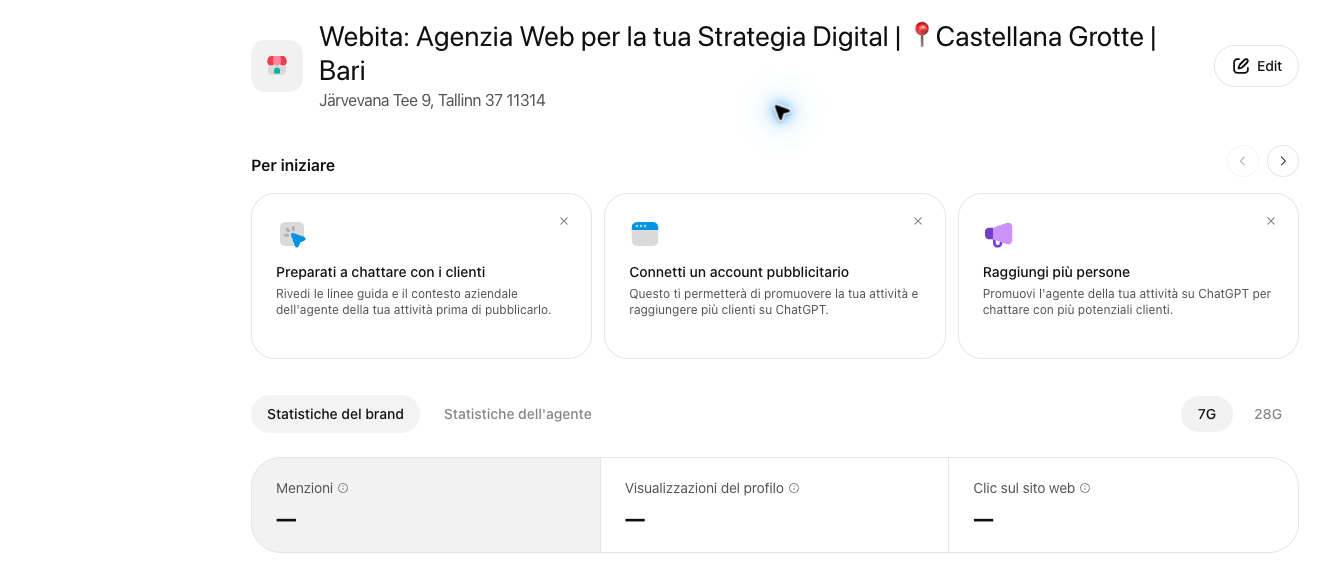
Webita’s Business Hub on November 27, 2026. The interface is in Italian; mentions, profile views and website clicks do not yet show available values.
What you can manage in the business profile
In Webita’s dashboard, I can see sections for company information, contact details, photos, location and opening hours. The category and description help explain what the business actually offers; the website and contact details need to lead people to the right place. Retailers may also have product feed features that provide prices and availability. The options you see depend on your business type and the features enabled for your account.
This is the first editorial task: check whether the name, category, location or service area, website and services match the business as it operates today. Webita’s listing, for example, still contains a historic local reference in its name, while the company now also works remotely and serves broader markets. I would not infer a ranking problem from that alone. It is simply the kind of inconsistency a manageable profile finally makes easier to spot and correct.
An up-to-date profile can help ChatGPT work with more accurate company information. It does not replace a readable website, clear service pages and verifiable content. If the listing promises one thing and the website describes another, the inconsistency reaches people precisely when they are comparing their options.
Insights: mentions, profile views and clicks tell different stories
Business Hub provides aggregate data on mentions, website clicks and discovery topics. In Webita’s dashboard I can also see “profile views” and switch between the past 7 and 28 days. At the time of my check, the values are marked “Unavailable.” It would be wrong to treat that as zero or conclude that nobody has ever seen Webita on ChatGPT.
OpenAI’s documentation gives these figures useful context. For an online business, a mention is counted when ChatGPT references its website; the brand name alone is not enough. A website click means someone chose to visit the site. Discovery topics group themes in answers where the business was mentioned or cited. They do not reveal individual prompts or measure buying intent directly. OpenAI only shows aggregated insights when privacy thresholds are met. A blank value can also mean data is still being collected or reporting is unavailable. Source: OpenAI’s guide to insights.
My practical reading is this: a mention tells us the site entered an answer; a click tells us someone wanted to learn more; an enquiry tells us that visit led to a contact. Those are three separate steps. Business Hub adds a first-party signal from ChatGPT. Analytics and Search Console are still needed to understand what happens on the site and in Google Search. To watch visibility across several AI systems and compare important queries over time, we built WebitaGeo, our SEO & GEO Tracking service. It is a complementary view, not a way to reconstruct private conversations.
When does a Business Agent make sense?
A Business Agent is an additional, optional feature with its own requirements. After claiming and verifying the business, an eligible ecommerce or online service company may be able to configure an agent that answers customer questions using the information and instructions the company provides. Before publishing it, you should test common questions, check answers about products, terms, returns or services, and correct mistakes. Availability may differ by category and country; a verified profile alone does not guarantee agent access.
The key point is separation. A conversation with a company’s agent is labelled and distinct from ChatGPT’s independent answers. Creating an agent does not give the business control over what ChatGPT says in every other conversation. OpenAI’s Business Agents Policy also says the agent must be clear that it is AI representing the company. It must not pose as a person or an independent adviser.
For a store that repeatedly answers the same pre-purchase questions, an agent could be a useful place to guide customers. For a complex service, the quality of the source information and the route to a human conversation matter even more. I would start with the questions customers actually ask, rather than a long list of features to show off.
What this means for SEO and GEO
A manageable listing does not create a new ranking formula. It does make one responsibility more visible: describe the business accurately and keep information consistent across its site, profile and other sources. A service page should answer concrete questions, explain who the offer is for and set out conditions or limits when relevant. That helps a person before it helps an AI system.
I would approach this in two directions. In Business Hub, review the listing, category, description and website. On the site, check whether the most important pages explain the offer clearly and are accessible, current and linked together. Our free SEO analysis is a starting point for checking technical and structural issues. SEO consulting becomes useful when you need to set priorities for content and conversion. Neither, on its own, guarantees a mention in ChatGPT.
In the end, the question remains practical: if a potential customer encounters Webita in an answer, will they find accurate information and a good reason to visit us? Business Hub gives us another place to check. The real work is still to explain what we do clearly, measure the signals available and improve what people find after the click.
Main sources: OpenAI’s November 10 announcement, updated November 19, 2026; official setup guide; Businesses in ChatGPT policy. Features and requirements may change during the beta.
Frequently Asked Questions
Do I need a ChatGPT Business subscription to claim my business?
No. Claiming an eligible business does not require a ChatGPT Business plan, an ads account or an Enterprise agreement. You still need to complete the required verification steps.
Will claiming a business improve its position in ChatGPT answers?
OpenAI does not promise a ranking advantage. Claiming lets you manage business information and, where available, view insights or configure a Business Agent. Independent ChatGPT answers remain separate.
Do blank insights mean nobody has seen my business?
No. Privacy thresholds, data collection still in progress or temporarily unavailable reporting may explain missing values. Unavailable data is not the same as zero.